![Agway Energy Services Logo_2025.png.png]](https://info.agwayenergy.com/hs-fs/hubfs/Agway%20Energy%20Services%20Logo_2025.png.png?height=40&name=Agway%20Energy%20Services%20Logo_2025.png.png)
Automatic Segment
Contacts will automatically be removed from the Dialer "Agway Renewal OB Campaign" when either of these conditions are met:
- Renewal — Account will no longer have an associated "Consent Pending" Deal
- Cancellation — Account will have an "NS INELIGIBLE REASON" known and Active Deal with "NS DROP ON_AFTER DATE" is known
When the Contact renews and/or cancels all eligible Accounts, none of the associated Accounts are eligible for Renewal anymore. Segment: Contacts to be REMOVED from Dialer "Renewal" campaign
The contacts will enroll in this workflow: Ops: Remove Renewals from Dialer CampaignManual Steps to Remove them
This segment of Contacts are those who have been sent to the Dialer Renewal Campaign and have not been removed yet: Contacts Already Sent to Dialer "Renewal" campaign
To manually stop renewal calls, do the following:
- Go to the segment Contacts Already Sent to Dialer "Renewal" campaign
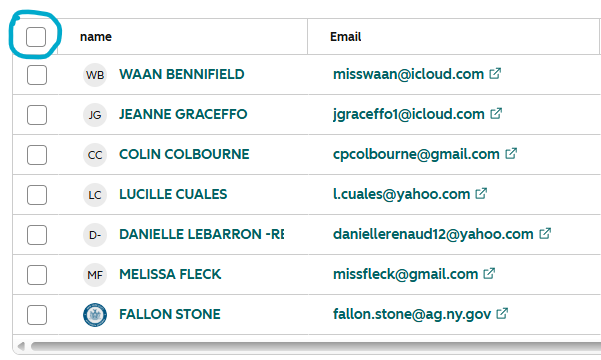
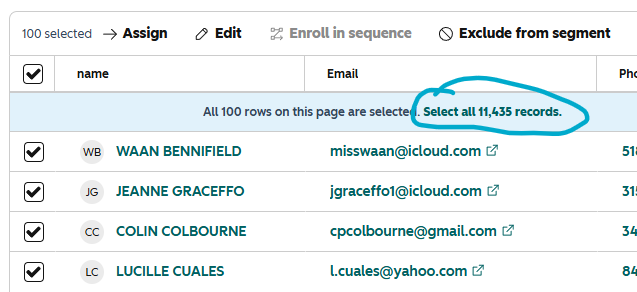
- Select all records by checking the top checkbox, then clicking the "Select all ______ records."
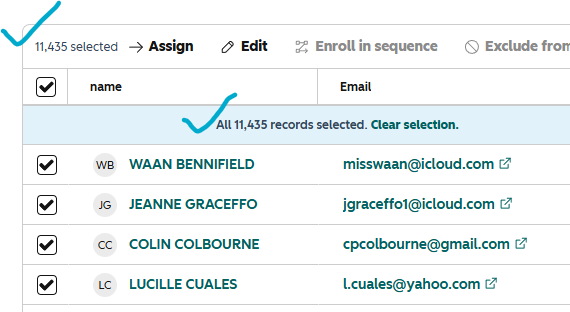
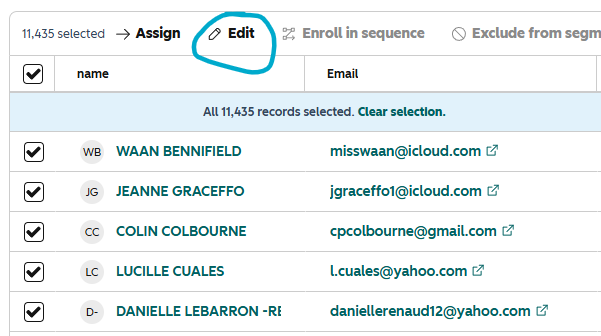
- After confirming that the entire segment has been selected, click the "Edit" button.
- Search for the property "Remove from Dialer Renewal Campaign." Set it to "Yes."
- Enter the number of records that will be edited. This is a safeguard the HubSpot provides when making bulk edits. Check the box as well.
- Click "Update." That's it! The contacts will enroll in this workflow: Ops: Remove Renewals from Dialer Campaign